Does PhotoCraft have AI? Remove Background and automatic selection, tested
PhotoCraft 0.23.1 has no generative AI or prompt-based image generation. Its automatic tools (Remove Background, Select Subject, Select Sky, content-aware fill) are described by the project as classical image analysis rather than machine-learning AI, and they run on your own computer. We found no separate model files in the Windows app, which fits that description but does not by itself prove it. In our test, Remove Background cut a person out in about a second but trimmed curly hair and kept bits of the chair; on a scene with no clear subject it removed nothing.
Which automatic tools exist
Engine commands present in 0.23.1: Remove Background, Select Subject, Object Selection, Select Sky, Remove tool, Content-Aware Fill, Content-Aware Move, Content-Aware Scale. No generative fill (no command that creates new image content from a text prompt). The project describes these tools as classical image-analysis methods rather than machine-learning features (as quoted in photocraft.im's guide); we found no model files and nothing downloaded when they ran, but we did not independently establish the implementation of every component. We read this from the app's own command list (photocraft-cli commands).
Remove Background on real photos
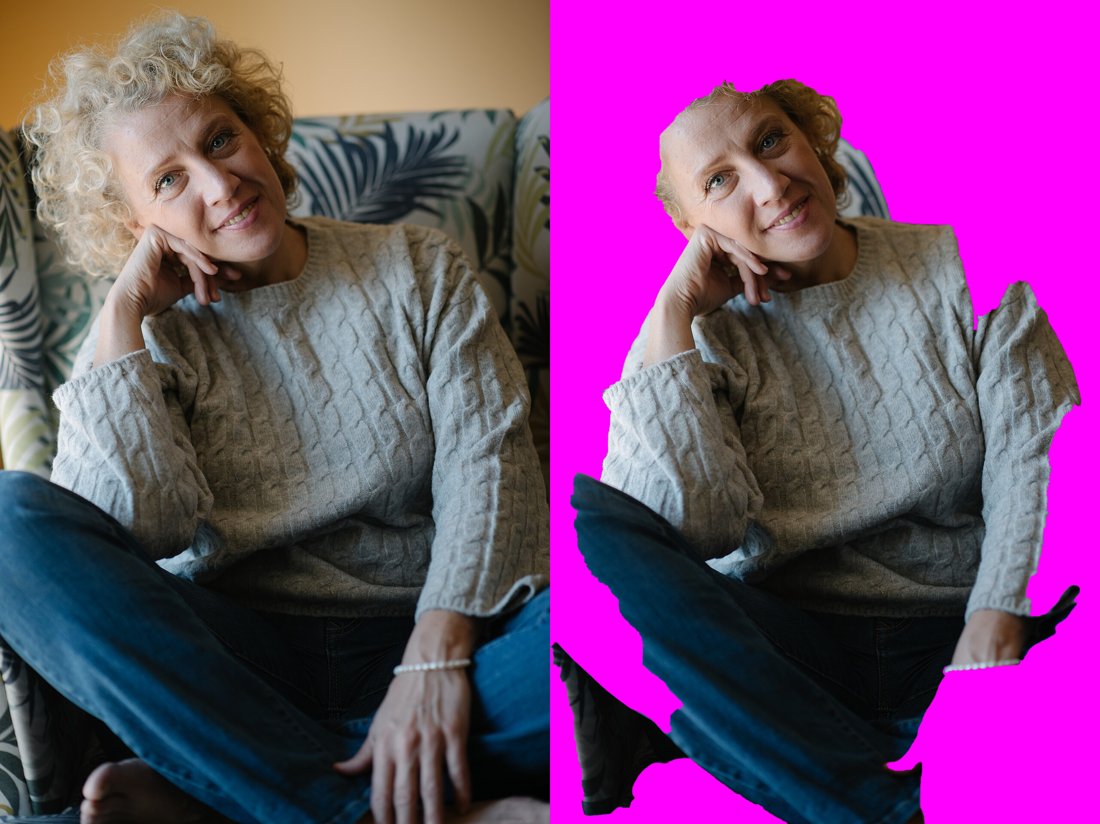
Left: original. Right: PhotoCraft's result, shown on magenta so the removed area is visible. Photo: Shixart1985, Wikimedia Commons, CC BY 2.0.

| Photo | Time | Result |
|---|---|---|
| Portrait, curly grey hair, patterned chair (Wikimedia Commons, 'Smiling senior woman with curly hair portrait' by Shixart1985, CC BY 2.0, 1280 x 1918) | 1.3 s, offline, Windows CLI | The person was cut out, but much of the curly hair was trimmed off, a piece of the chair stayed by the shoulder and another by the foot, and edges are hard: only 0.6% of pixels are partly transparent. |
| Dog park with trees and no clear subject (Wikimedia Commons, 'Freedom Park Dog Park', CC0, 1280 x 960) | 1.0 s | Nothing was removed: 0% of pixels became transparent. |
Windows app 0.23.1, command layer.removeBackground, no internet needed. Same engine as the browser version.
What this means for you
- Simple subject, plain background: worth trying; check the edges.
- Hair, fur or busy backgrounds: expect to clean up the mask by hand.
- No clear subject: it may do nothing; select the area yourself instead.
- Want to add or replace content from a prompt: PhotoCraft cannot do that; Content-Aware Fill only fills from nearby pixels.